Skip to content

Independent guide to Emma & Nora

Emma Nora AI: Try and Compare Both

Emma Nora AI refers to Emma and Nora, two AI characters from Nuance Labs that you can talk to on a video call. If you searched emma nora ai to find out who appears in the clips, this guide identifies both and gives you three prompts to compare how they listen, respond, and handle a correction. The calls themselves take place in Nuance Labs’ preview.

Calls take place on the Nuance Labs website. This guide does not use your camera or microphone.

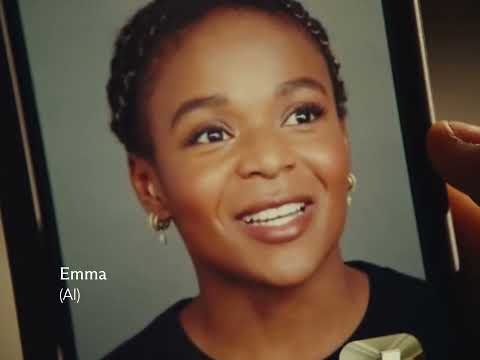
Emma, the AI persona, in a frame from Nuance Labs’ published introduction video
EmmaNuance Labs introduction
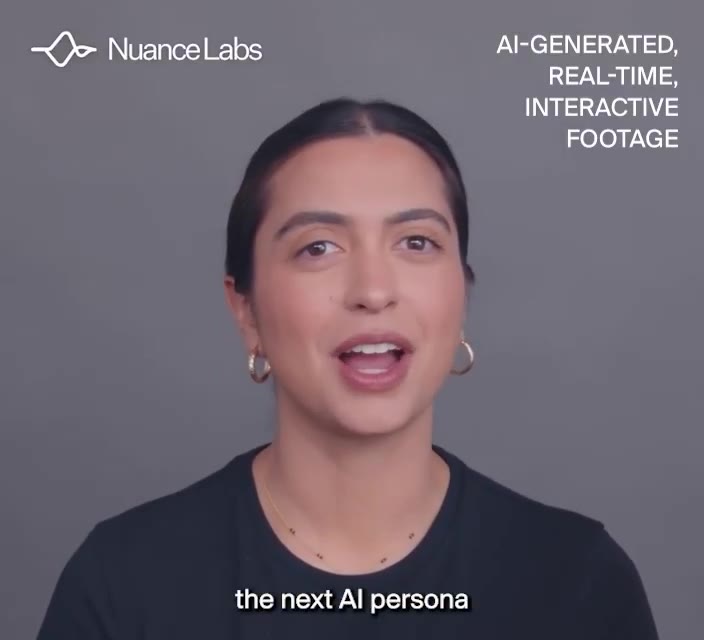
Nora, Nuance Labs’ AI persona, in a frame from her published introduction video
NoraNuance Labs announcement
Real frames from the characters’ published video introductions. No image here links away from this guide.
01

Start with the names

What is Emma Nora AI?

Emma and Nora are separate AI characters in Nuance Labs’ video-call research preview. They use generated faces and voices and respond to speech and visual cues in real time, so timing, interruptions, gaze, and camera understanding shape the experience. Emma arrived first; Nora followed in November 2026. In searches such as “Nuance Labs Nora” or “Nora AI Nuance,” Nora means this character, not an unrelated product with the same name.

PERSONA 01

Emma

The first character Nuance Labs introduced. Start with Emma if you came looking for the face in the company's November 9, 2026 launch demo. The company says an actress worked with the team on Emma's face, voice, and mannerisms. Emma is an AI character, not a live human answering your call.

PERSONA 02

Nora

The second character, announced on November 17, 2026. Start with Nora if you saw the mirror video or came here looking for Nora AI by Nuance Labs. The studio says a different actress contributed to Nora's performance. Use the same prompts with both characters before deciding whose conversation style you prefer.

Nuplex is Nuance Labs’ audiovisual model. “Full duplex” means listening and speaking can overlap instead of waiting for a turn to finish. This can make conversation feel more natural, but pauses, noise, and interruptions are harder to handle reliably. Nuance Labs lists these issues, along with visual misreads and occasional gaze or lip-sync glitches, as Emma limitations.

Evidence note: Nuance Labs’ published Emma research note is a first-party product account, not an independent benchmark. The Nora announcement and creator tests appear below.

02

Go to the source

How to talk to Emma or Nora

To talk to Emma or Nora, you need Nuance Labs’ own research preview; this independent guide does not host calls. People searching “talk to Emma” or “talk to AI Emma” usually need the same practical answer: use the provider’s preview, check its current access rules, and choose whether to enable camera or microphone there. Before opening it, use the comparison prompts below to decide what you want to test. Availability and queues can change.

  1. 1

    When you are ready, use the single Official preview link at the end of this guide. Confirm the address belongs to Nuance Labs before granting browser permissions.

  2. 2

    Follow the instructions and choose a character if that option is available. Nuance Labs says Emma is for adults 18 and older, and its current preview is English-only. Review the provider's notice before granting access to any device.

  3. 3

    Begin with an ordinary question that does not require personal details. If you are comparing them, use the same question in a separate call with the other character.

Nuance Labs’ published Emma FAQ lists adult access in the United States except Colorado, Connecticut, Illinois, and Texas; the EU; the UK; and Canada except Quebec. It says an account is not required. Terms may change and Nora’s availability may differ, so check the preview first. Other products share these names; verify the Nuance Labs domain before sharing information.

03

A simple, repeatable check

Run the Emma Nora AI comparison test

For an Emma Nora AI comparison, ask each character the same three questions. Use the same device and room if you can, and write down what actually happened. This is an informal test you run in the official preview; there is no automatic score or call recording on this page. Comparing both personas this way separates a memorable clip from what you observed in your own session.

01

Give it two constraints

Give me two ideas for a rainy Saturday. One has to be free, and both need to be indoors.

Check both ideas against the constraints, then ask for the free option in one sentence. Does the reply carry the right detail forward?

02

Pause before finishing

I'm planning a picnic on Saturday … actually, Sunday. What should I bring?

Pause before the correction. Did the character wait, answer early, or use the new day? Record timing and correction accuracy separately.

03

Try a visual cue if you want to

What am I holding up? If you're unsure, say what you can make out.

If you use your camera, show a plain mug, then another familiar object. Keep private items out of frame. A description that changes with the object is more informative than a generic guess. Skip this prompt if you prefer to leave your camera off.

How to read your notes

Record “followed both constraints,” “missed the correction,” or “described the wrong object.” Repeat a test if lag interfered. One session describes your device and conditions; it cannot establish how either character performs for everyone.

Review access and privacy notes
04

Watch the source, then test it

Official Emma demo and what to notice

These are real published videos, not recreated portraits. Nuance Labs’ launch films introduce the characters; creator videos are demonstrations, not controlled tests. If you searched for Emma Nora AI videos, watch the introductions, then use the prompts above to check behavior yourself.

Nuance Labs, “Meet Emma, the First Nuance AI Persona.” A launch demo is a selected example, not an independent performance test.
Nuance Labs’ Nora introduction, posted November 17, 2026. The original video plays here; no social-post link is needed.
Nuance Labs’ AI Personas and Safety video, embedded for in-page playback.

This is the provider’s account of its safety approach. Review current privacy information and terms before a call.

01

Listen for turn timing

Does Emma wait, answer during a pause, or speak over a correction? One edited moment cannot show how often this happens.

02

Watch face and gaze

Look for expressions and gaze shifts that accompany speech. These are generated cues; a convincing expression does not prove feelings or awareness.

03

Separate claims from evidence

Nuance Labs describes Nuplex as full-duplex audiovisual technology. A clip illustrates one conversation; it cannot verify every capability or predict your result.

Nuance Labs says the call processes audio and visual input in real time with generated voice and facial response. For a useful comparison, record the prompt, setting, and response; an edited clip cannot establish consistency.

05

From a clip to a useful test

Why are people sharing Emma and Nora clips?

Emma Nora AI clips turn an ordinary video call into something viewers can test: will a character notice an interruption, follow a joke, or respond to something in frame? Nuance Labs introduced Emma on November 9, 2026, and announced Nora on November 17. Creators gained two distinct personas to compare, and a “mirror” moment prompted questions about how a model interprets its own image. That highly visual, easy-to-understand moment is a plausible reason short clips spread, though views alone cannot prove why each person searched.

The attention also had a practical trigger: on November 20, Nuance Labs said demand to chat with Emma and Nora had overwhelmed its system. On November 24, the company reported more than one million conversations and 100,000 hours of face-to-face conversation during the preview’s first two weeks. Those are company-reported figures, not independently audited usage statistics; together with the character launch and shareable clips, they help explain why people looked for access, demos, and comparisons.

Creator videos invite reactions to a comeback, interruption, object guess, or two avatars talking. Framing, prior context, prompts, connection, and editing shape each clip. One response cannot establish repeatability, hidden memory, self-awareness, or general capability.

Emma’s design has prompted debate about representation and using a Black woman’s likeness for an AI persona. Black Enterprise covered the concerns; Nuance Labs says the actress licensed her likeness and helped shape Emma’s face, voice, and mannerisms. That context does not settle broader questions of representation or ownership.

A clip can hide earlier context. If an answer sounds perceptive, ask whether the character was already told what was in view. The two-object prompt gives a concrete observation if the description changes, but says nothing about internal experience or consciousness.

06

Before your first call

Access, camera, and common snags

Can I talk to Emma without showing my face?

Check the preview’s camera options. If you can continue without video, use the speaking prompts and skip the visual test. That tests conversation flow, not scene understanding.

How do I talk to Emma in the Nuance Labs preview?

To talk to Emma, use the provider’s research preview and follow the options shown there. This guide’s prompt cards help you prepare and compare Emma with Nora; they do not start a call, collect camera or microphone input, or provide a live AI chat.

What if the preview will not open or the call will not start?

Read the preview’s message first. If your browser blocked a device, check site permissions and whether another app is using it. If access is unavailable, follow the provider’s instructions; this guide cannot diagnose a specific account, device, or location.

What if the character keeps interrupting or mishears me?

Try a quieter room or headphones and leave a clear pause after a short question. Nuance Labs lists noise and long pauses as Emma limitations. Note freezes or audio cuts separately from character behavior.

Who handles my camera and microphone?

The provider runs the call. Review its permission prompts and privacy information; keep sensitive documents, other people, and private conversations out of frame. Use the test prompts without opening the preview if you prefer.

Ready to try a conversation? Open the official Nuance Labs preview ↗. This external preview is provided by Nuance Labs.